Exchange Online Tenant Outbound Email Limits: What You Need to Know & Why ACS Is the Answer
If you manage a Microsoft 365 environment, you’ve likely heard the buzz around a significant change Microsoft introduced in 2025: tenant-level outbound email limits for Exchange Online. This isn’t just a minor policy tweak — for organizations that rely on Exchange Online to send bulk or transactional emails to external recipients, it’s a structural shift that demands immediate attention.
In this post, we’ll break down what the Tenant External Recipient Rate Limit (TERRL) is, what happens when your tenant gets blocked, and how the three main Microsoft email sending options — standard Exchange Online, High Volume Email (HVE), and Azure Communication Services (ACS) — differ. We’ll then take a deeper look at ACS as the recommended path forward.
The Problem: Exchange Online Outbound Limits (TERRL)
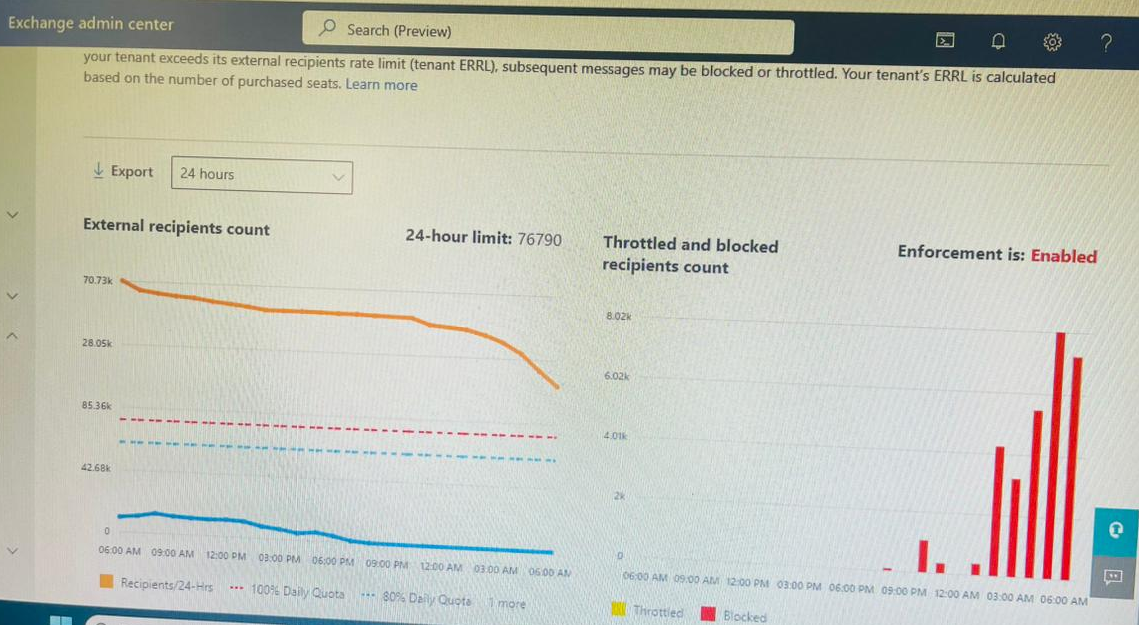
Microsoft introduced the Tenant External Recipient Rate Limit (TERRL) — a daily cap on the number of external recipients a Microsoft 365 tenant can email. The limit operates on a rolling 24-hour sliding window and is based on the number of Exchange Online or EOP licenses your organization holds.
How Is the Limit Calculated?
- 1 license ≈ 10,000 external recipients / day
- 1,000 lic. ≈ 72446 external recipients / day
- 100,000+ Maximum cap of 1.5 million / day
- Trial only Hard cap at 5,000 / day — regardless of licenses
What Counts as “External”?
Any email address whose domain is not an accepted domain in your tenant counts as external — customers, partners, vendors. Distribution group members are counted individually, and emails routed through third-party signature services can count twice: once outbound to the service, again when delivered to the final recipient.
What Does NOT Count Toward the Limit?
Journaling messages · Automatic Replies / Out of Office · Delivery Status Notifications (NDRs) · Messages sent via Azure Communication Services (ACS) · Messages sent via HVE · Notifications from Microsoft cloud apps (SharePoint, Teams, Yammer)
Rollout Timeline
Microsoft began enforcing TERRL in phases starting April 3, 2025, completing for all standard tenants by May 1, 2025. GCC environments followed in mid-2025, with GCC High, DoD, and Gallatin environments scheduled for the second half of 2025.
What Happens When Your Tenant Gets Blocked?
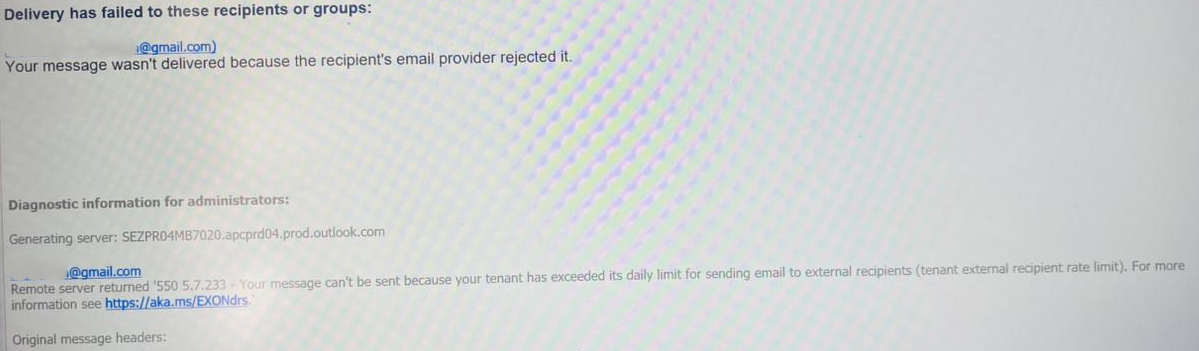
When TERRL is exceeded, Exchange Online stops delivering messages to external recipients until your rolling 24-hour volume drops back below the threshold. Legitimate emails to customers will silently fail.
NDR Bounce Codes
550 5.7.232
Your message can’t be sent because your trial tenant has exceeded its daily external recipient limit.
550 5.7.233
Your message can’t be sent because your tenant exceeded its daily limit for sending to external recipients.
How to Monitor Your Limit
Exchange Admin Center (EAC): Navigate to Reports › Mail Flow › Tenant Outbound External Recipients Rate — shows your daily quota, current usage, and blocked recipient counts.
# Check current TERRL enforcement status
Get-LimitsEnforcementStatus

# Key fields to watch:
EnforcementEnabled : True
Verdict            : Block   # Block = tenant is currently throttled
Threshold          : 72,446
ObservedVolume     : 76790
At enforcement launch, Microsoft had not shipped notifications for 80% quota or block events. This feature was planned for later in 2025 — verify the current status in your EAC.
Understanding Your Microsoft Email Options
Microsoft now provides three distinct email sending options. Each serves a different purpose, and understanding the boundaries will help you architect the right solution for each workload.
Full Comparison Table
| Feature | Exchange Online | HVE | ACS Email |
|---|---|---|---|
| External recipients | ⚡ Limited (TERRL) | ✗ Not supported | ✓ Unlimited |
| Internal recipients | ✓ Unlimited | ✓ Unlimited | ✓ Supported |
| Counts toward TERRL | ✗ Yes — counts | ✓ Exempt | ✓ Exempt |
| Bulk / transactional email | ✗ Not intended | ✗ Internal only | ✓ Designed for it |
| Modern authentication | OAuth / Basic | OAuth + Basic till 2028 | OAuth (Entra ID) |
| Custom domain sending | ✓ Yes | ⚡ Limited | ✓ SPF / DKIM / DMARC |
| Delivery analytics | Basic | Basic | ✓ Advanced |
| Compliance certifications | M365 standard | M365 standard | ✓ HIPAA, GDPR, SOC 2 |
| Pricing model | M365 license | PAYG (Azure) | PAYG (Azure) |
Deep Dive: Azure Communication Services Email
ACS Email is Microsoft’s purpose-built platform for high-volume, application-to-person (A2P) email communication. Generally available since April 2023, it sits outside Exchange Online’s architecture entirely — meaning TERRL has zero effect on messages you send through it.
ACS imposes no cap on external recipients. Microsoft has internally validated throughput of up to 2 million emails per hour, with higher levels available on request.
REST APIs, SDKs (.NET, Python, JS, Java), SMTP relay for legacy apps, Power Automate connectors, and PowerShell cmdlets — all supported out of the box.
Full SPF, DKIM, and DMARC support. Send from your own verified custom domains so recipients see a trusted, recognizable sender address.
Near-real-time delivery analytics, bounce tracking, engagement metrics, opt-out suppression lists, and log storage via Azure Monitor and Azure Storage.
HIPAA, GDPR, and SOC 2 certified. Built for regulated industries — healthcare, finance, and legal workloads are fully supported.
No flat monthly fee. You pay only for what you send — ideal for organizations with bursty or seasonal sending patterns.
ACS Email Pricing
Getting Started with ACS Email
For Configuring Azure Communication Services & SMTP, see: Moving Email Traffic from Exchange to Azure Communication Services — Azure Communication Service Series
Conclusion
Microsoft has drawn a clear line — act before it affects you.
TERRL is not a bug or a temporary policy. It’s a deliberate architectural statement: Exchange Online is not a bulk email platform. For organizations that have been using it as a catch-all for newsletters, customer notifications, automated alerts, and marketing campaigns, the time to rethink that approach is now.
- → Standard employee communication — Stay on Exchange Online as-is. No action needed.
- → Internal app / device email (HR notifications, scan-to-email, IT alerts) — Migrate to Exchange Online HVE, generally available as of March 2026.
- → External, bulk, or transactional email — Adopt Azure Communication Services Email. Purpose-built, scales to millions per hour, fully exempt from TERRL, and Microsoft’s strategic path forward.
Don’t wait until your tenant gets blocked and customers stop receiving your emails. Audit your outbound volume today in EAC and start planning your ACS migration before enforcement catches you off guard.
References
- Introducing Exchange Online Tenant Outbound Email Limits — Microsoft Community Hub
- Exchange Online Limits — Microsoft Learn
- High Volume Email: Continued Support for Basic Authentication & Other Updates — Microsoft Community Hub
- Moving Email Traffic from Exchange to Azure Communication Services — Microsoft Community Hub
- Azure Communication Services Email Overview — Microsoft Learn
- Azure Communication Services Pricing — Microsoft Azure
- High Volume Email vs Azure Communication Services — TechieLass
- New Exchange Online Outbound Email Limits — LazyAdmin
- Microsoft Announces Tenant-Level External Recipient Rate Limit — Practical365