Fixing UPN vs. Email Mismatches
A step-by-step guide to resolving on-premises UPN misalignments that cause failed soft-matching and duplicate cloud accounts during Entra ID sync.
The table below shows three users. Where the on-premises
UserPrincipalName does not match the cloud primary email,
AD Connect cannot perform a soft match and will create duplicate accounts instead.
| User | On-Prem UPN | Cloud Primary Email | Status |
|---|---|---|---|
| Robin Pradhan | robin.pradhan@maharjan-binod.com.np |
robin@maharjan-binod.com.np |
✗ Mismatch |
| Bibek Aryal | bibek.aryal@maharjan-binod.com.np |
bibek.aryal@maharjan-binod.com.np |
✓ Match |
| Sushan BK | sushan@maharjan-binod.com.np |
sushan.bk@maharjan-binod.com.np |
✗ Mismatch |
Update each mismatched on-premises UserPrincipalName
to exactly match the cloud primary email. Run on a domain controller or any machine
with the ActiveDirectory PowerShell module installed.
# Fix Robin: change UPN from robin.pradhan@ → robin@
Set-ADUser -Identity "robin.pradhan" `
           -UserPrincipalName "robin@maharjan-binod.com.np"

# Fix Sushan: change UPN from sushan@ → sushan.bk@
Set-ADUser -Identity "sushan" `
           -UserPrincipalName "sushan.bk@maharjan-binod.com.np"
-Identity parameter accepts a SAM account name,
distinguished name, GUID, or SID. It is required —
positional binding is not supported by Set-ADUser.
Before triggering a sync, confirm both users are inside an OU included in the AD Connect sync scope. Then trigger an Initial sync to force full re-evaluation of all objects.
# Verify connector is healthy first
Get-ADSyncConnectorRunStatus

# Trigger a full initial sync cycle
Start-ADSyncSyncCycle -PolicyType Initial
After a successful sync, AD Connect performs a soft match by comparing the updated on-premises UPN against the cloud proxyAddresses / SMTP values. The accounts merge automatically — on-premises AD becomes the source of truth for identity attributes.
maharjan-binod.com.np
is a verified custom domain in the Microsoft 365 Admin Center
(Settings → Domains) before your first sync. AD Connect will silently
rewrite UPNs to the tenant’s default .onmicrosoft.com
domain if the custom domain is not yet verified.
Demonstration:
Step 1: Validate Current Identity State. Confirm that the On-premises AD and Microsoft Entra ID accounts exist as separate, unsynced entities representing the same identity across both environments.
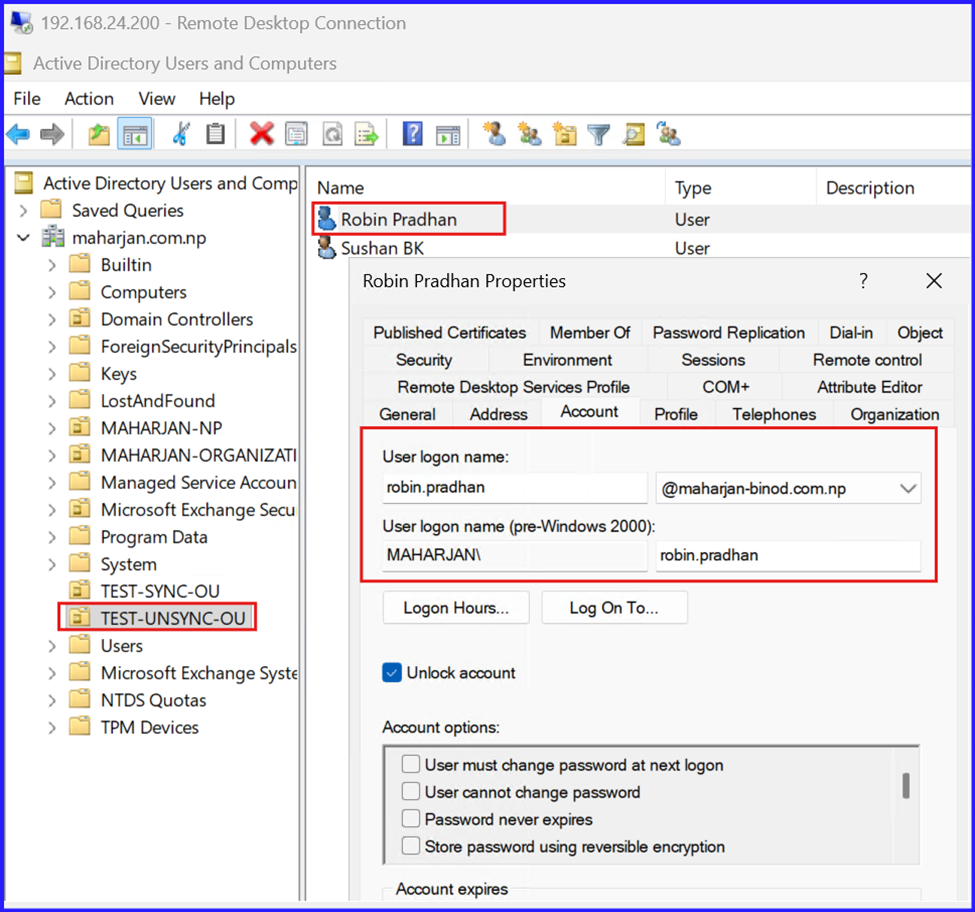
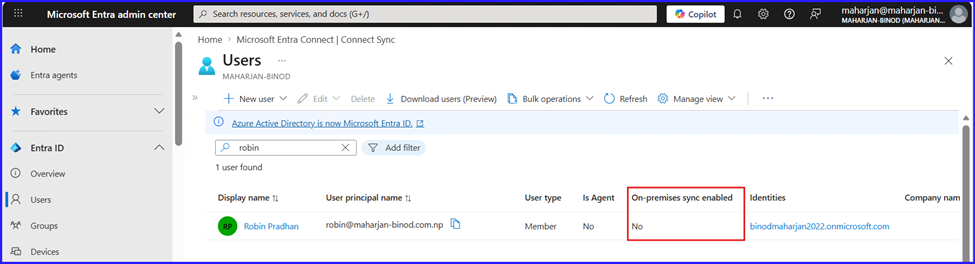
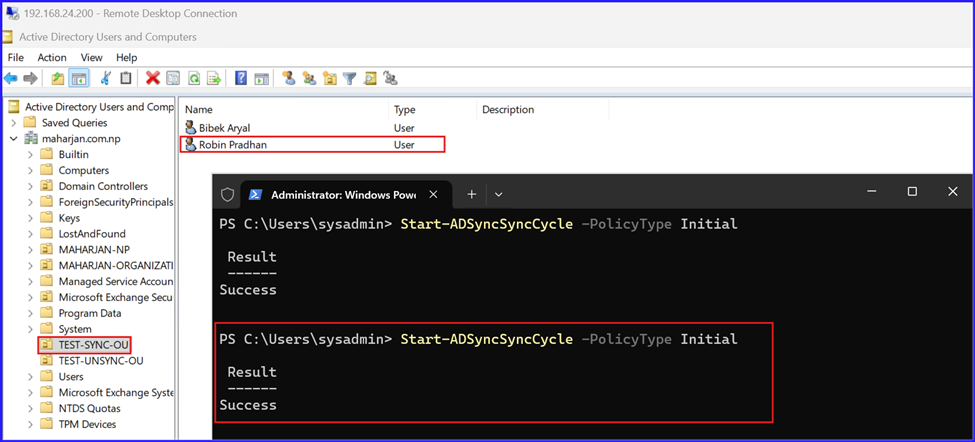
Step 2: Initiate Identity Matching. Move the On-premises user object into a synchronized OU (Organizational Unit) and trigger a Delta Sync to link the local account with its cloud counterpart.
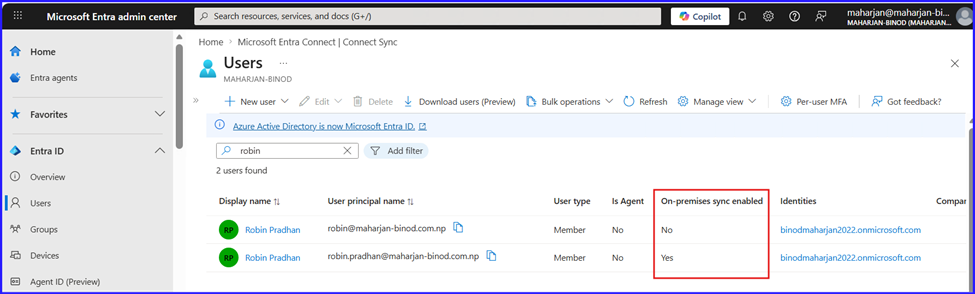
Step 3: Remediate Synchronization Errors. Address the duplicate user conflict by configuring a soft-match. Align the primary identifiers between the On-premises AD and Entra ID environments to facilitate a successful identity merge during the next sync cycle.
Step 3.1: Reset Sync State and Verify Cloud Identity. Move the user back to a non-synchronized OU and trigger a sync cycle. Use PowerShell to confirm the account has reverted to a “Cloud-only” status before attempting the match again.
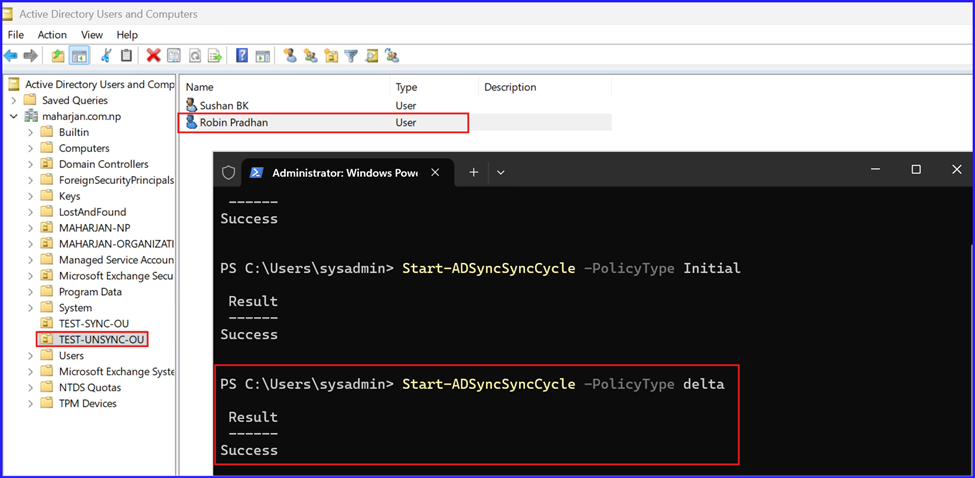
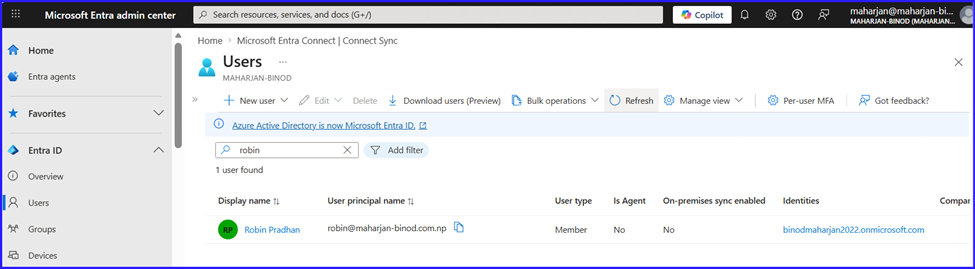
Step 3.2: Align Attributes for Soft-Match. Update the On-premises UserPrincipalName (UPN) and Primary SMTP address to exactly match the Cloud identity attributes, ensuring a successful Soft-Match.
Set-ADUser robin.pradhan -UserPrincipalName robin@maharjan-binod.com.np
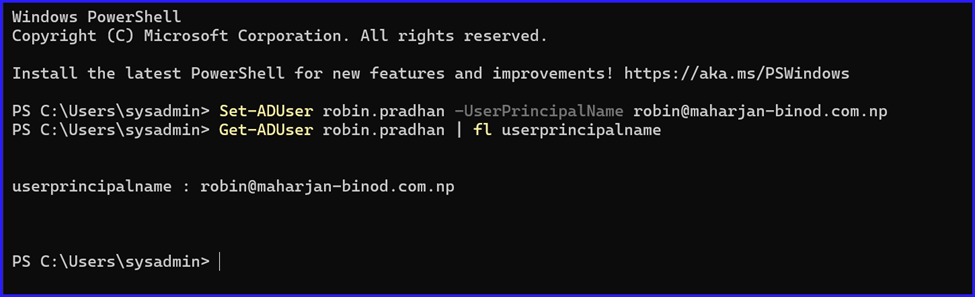
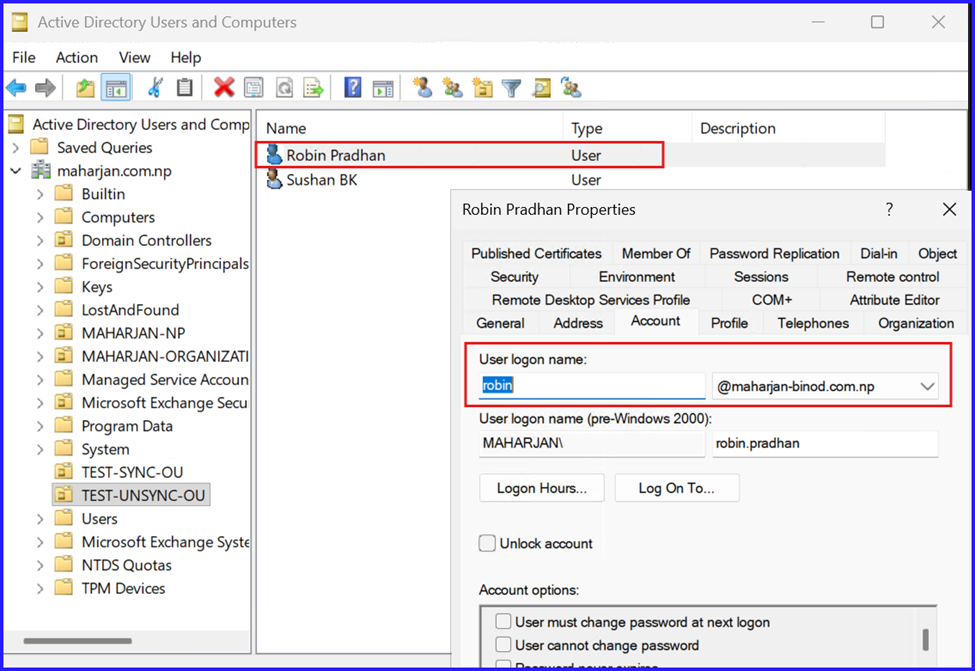
Step 3.3: Re-enable Synchronization. Move the user object back into a synchronized OU and initiate a Delta Sync to finalize the identity match.
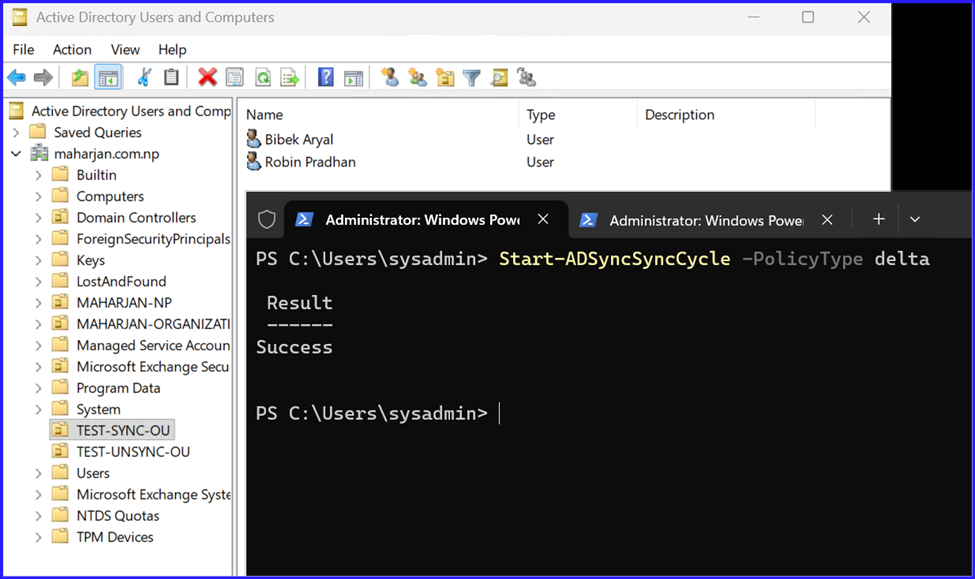
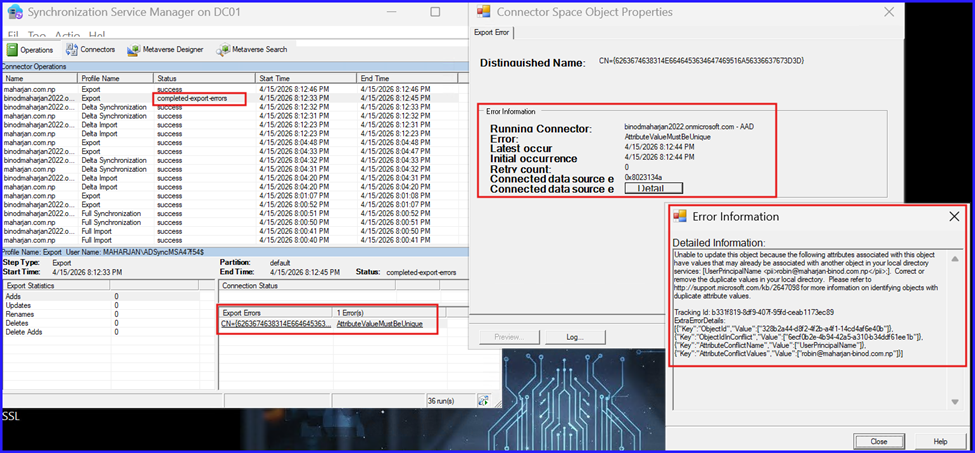
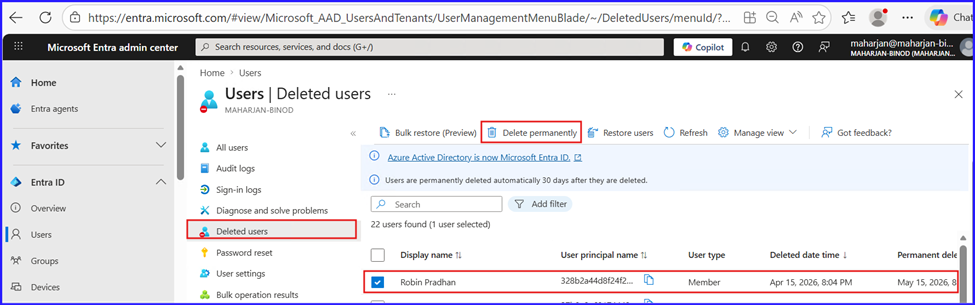
Step 3.4: Resolve Attribute Conflicts and Purge Orphaned Objects. Address export errors by permanently deleting the conflicted user from the Entra ID “Deleted Users” container. This clears the reserved attributes, allowing a clean synchronization of the On-premises identity.
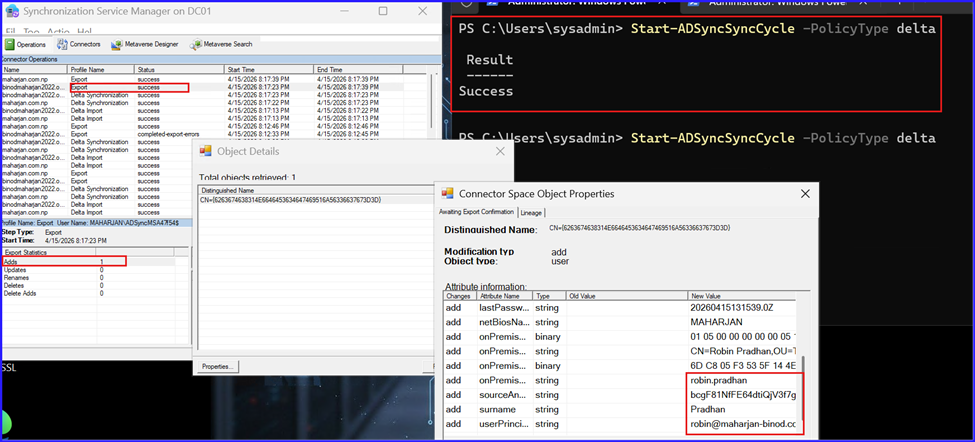
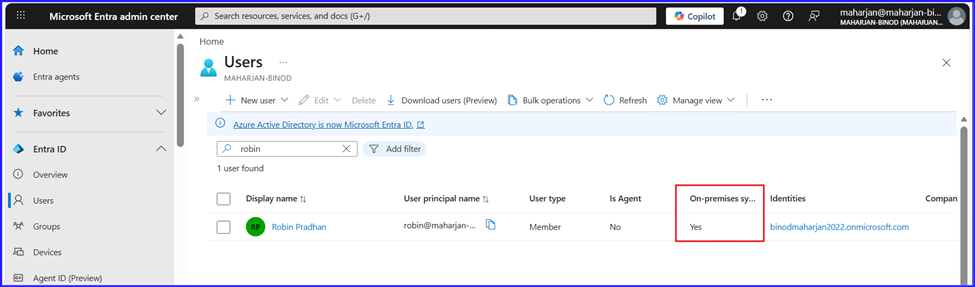
Step 3.5: Final Validation of Soft-Match Integration. Confirm that the On-premises user has successfully synchronized and merged with the existing Cloud identity. Perform a final authentication test using On-premises AD credentials to verify that Single Sign-On (SSO) or password synchronization is functioning correctly.
Step4: Analyze the Environment and current Situation
On-Prem AD (Source)
| Name | SamAccountName | UPN |
| Robin Pradhan | robin.pradhan | robin.pradhan@maharjan-binod.com.np |
| Bibek Aryal | bibek.aryal | bibek.aryal@maharjan-binod.com.np |
| Sushan BK | Sushan | sushan@maharjan-binod.com.np |
Above On-Premises Users were used to authentication domain device login purpose only.
Microsoft 365 / Entra ID (Cloud)
| Display Name | Type | |
| Robin Pradhan | robin@maharjan-binod.com.np | UserMailbox |
| Bibek Aryal | bibek.aryal@maharjan-binod.com.np | UserMailbox |
| Sushan BK | sushan.bk@maharjan-binod.com.np | UserMailbox |
| Info | info@maharjan-binod.com.np | SharedMailbox |
Above Entra ID Users were used for Microsoft 365 services like Outlook Email, Onedrive for business, Teams and more.
⚠️ Key Issue (Very Important)
❌ UPN ≠ Primary Email mismatch
| User | UPN (AD) | Email (M365) | Status |
| Robin | robin.pradhan@… | robin@… | ❌ mismatch |
| Bibek | bibek.aryal@… | bibek.aryal@… | ✅ OK |
| Sushan | sushan@… | sushan.bk@… | ❌ mismatch |
Current Correct the Scenario:

Summary: Resolving Identity Conflicts via Soft-Match
This activity detailed the process of consolidating disconnected identities between an On-premises Active Directory (AD) and Microsoft Entra ID. The primary challenge involved merging two separate accounts representing the same individual into a single, synchronized identity.
The workflow followed a systematic approach to resolve attribute conflicts and establish a reliable sync link:
- Final Validation: Confirmed a successful merge where the On-premises AD became the source of authority, verified by a successful login using local credentials.
- Status Audit: Identified that the user existed in both environments but remained unsynced, creating a “duplicate identity” risk.
- Initial Sync Attempt: Moved the user into the synchronization scope, which initially failed due to existing attribute conflicts.
4. Conflict Remediation:
- Reverted the user to an “Un-Synced” state to reset the link.
- Identified that the Cloud object was retained in the Entra ID Deleted Users container, reserving the UPN/Email attributes.
- Permanently purged the deleted object to clear the attribute path.
5. Soft-Match Execution: Aligned On-premises attributes (UPN and SMTP) with the Cloud identity and re-initiated the synchronization cycle.
Conclusion
The successful execution of this Soft-Match highlights the importance of attribute consistency and the impact of the Entra ID Recycle Bin on synchronization. By aligning the UserPrincipalName and Primary SMTP addresses, we effectively bridged the gap between On-premises and Cloud environments.