ADFS Foundations
Concepts, Protocols & Terminology – The What, Why and How
1. Why Bother with Theory? 🤔
Before we install a single server, let’s nail the language of identity federation. ADFS sits at the crossroads of several protocols and concepts – SAML, WS‑Federation, OAuth, OpenID Connect. Understanding these will save you hours of blind troubleshooting later.
By the end of this post, you’ll be able to draw a federation flow on a whiteboard and explain exactly where ADFS fits. No lab required – just a coffee and an open mind.
2. The Big Picture: Federation & Trust
Imagine you work for MAHARJAN. You want to give your users access to a SaaS app like Salesforce without creating new accounts. You federate with Salesforce: instead of Salesforce handling the login, your company’s identity provider (ADFS) vouches for the user’s identity.
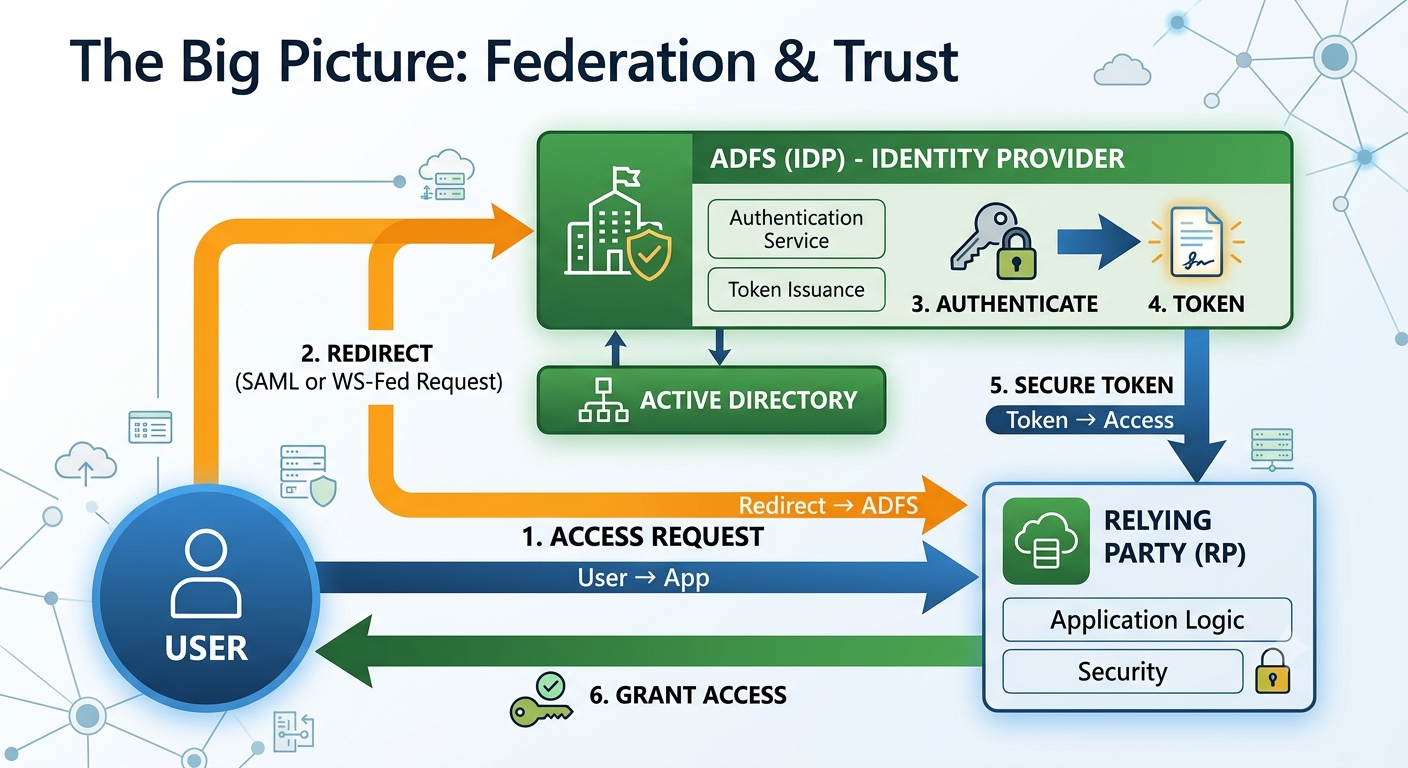
Key roles:
- Identity Provider (IdP) – the service that authenticates users (ADFS).
- Relying Party (RP) / Service Provider (SP) – the application that trusts the IdP (Exchange OWA, Salesforce, etc.).
- Claim – a piece of information about the user (email, name, group memberships) that the IdP sends to the RP inside a token.
- Token – a digitally signed document (SAML assertion, JWT) that proves the user’s identity and contains claims.
3. The Federation Protocols ADFS Speaks
ADFS supports multiple protocols. The right choice depends on the application and the era it was built in.
WS‑Federation (WS‑Fed)
An older, SOAP‑based protocol heavily used by on‑premises Microsoft products (SharePoint, Exchange OWA, Dynamics CRM).
Typical flow: Browser redirects, SAML tokens carried in HTTP POST. ADFS acts as the Security Token Service (STS).
SAML 2.0
The industry standard for web‑based SSO. Used by countless SaaS apps (Salesforce, Google Workspace, Dropbox).
Token format: XML‑based SAML assertions. Works with HTTP Redirect & POST bindings.
OAuth 2.0 & OpenID Connect (OIDC)
Modern protocols for API authorization (OAuth) and authentication (OIDC). OIDC adds an identity layer on top of OAuth, using JSON Web Tokens (JWT).
ADFS 2019+ supports OAuth and OIDC natively – crucial for mobile apps and Single Page Applications.
Quick Comparison
| Protocol | Token Format | Primary Use | Browser‑based? |
|---|---|---|---|
| WS‑Fed | SAML (XML) | Legacy Microsoft apps, OWA | Yes (passive profile) |
| SAML 2.0 | SAML (XML) | SaaS SSO | Yes |
| OAuth 2.0 | JWT / opaque | API authorization, native apps | Optional |
| OpenID Connect | JWT (id_token) | Modern web & mobile authentication | Yes |
4. Claims – The Currency of Federation
A claim is simply a statement about a user. For example: “This user’s email is abi@maharjan.np” or “This user is a member of the ‘Finance’ group”.
When ADFS authenticates a user against Active Directory, it retrieves the user’s attributes (from AD) and packages them as claims inside a signed token. The relying party then uses these claims to make access decisions or personalise the experience.
ADFS has a powerful claim rule engine that can transform incoming AD attributes into any outgoing claim type. For instance, you can map
objectSid to a custom claim, or join the user’s department and country into a single claim. We’ll master this in Part 4.
Example Claim Rules
- Transform LDAP Attribute to Claim –
c:[Type == "http://schemas.microsoft.com/ws/2008/06/identity/claims/windowsaccountname"] => issue(Type = "http://schemas.xmlsoap.org/ws/2005/05/identity/claims/upn", Value = c.Value); - Add a Static Claim –
=> issue(Type = "http://schemas.microsoft.com/ws/2008/06/identity/claims/role", Value = "Employee"); - Conditional Claim –
c:[Type == "http://schemas.microsoft.com/ws/2008/06/identity/claims/groupsid", Value == "S-1-5-21-..."]] => issue(Type = "http://schemas.microsoft.com/ws/2008/06/identity/claims/role", Value = "Admin");
5. IdP‑Initiated vs. SP‑Initiated Sign‑On
There are two main ways a user can start a federated login:
- Service Provider (SP)‑Initiated – The user tries to access the app first (e.g., clicks a bookmark to OWA). The app sees no session, redirects the browser to the IdP (ADFS) for authentication. This is the most common real‑world flow.
- Identity Provider (IdP)‑Initiated – The user goes to the ADFS sign‑on page, selects a relying party, and is then redirected to the app already authenticated. Useful for testing and for portals.
In our lab we’ll configure both for Exchange OWA, so you’ll see the difference firsthand.
6. Establishing Trust: Certificates & Metadata
How does a relying party know it can trust the tokens from ADFS? Through certificate‑based trust.
- The IdP (ADFS) signs every token with its token‑signing certificate.
- The relying party imports the IdP’s public key (or the whole signing certificate) and uses it to validate the token’s signature.
- Additionally, the IdP and RP exchange federation metadata – XML files that describe endpoints, certificates, and claim types. This automates most of the trust configuration.
When you add a relying party trust in the ADFS console, you’re essentially telling ADFS, “Here’s the app, here are its identifiers, and here’s what claims to send.”
Token‑signing and token‑decryption certificates have expiration dates. ADFS can auto‑renew them (if using AD CS) or you can manually roll them. We’ll cover certificate renewal strategies in Part 9 (Security & DR).
7. Clearing Up Common Confusions
mail). A claim is the output after transformation – it can be the same value or something derived (e.g., emailaddress claim with the same value). Claims are standardised for interoperability.
8. 🧠 Knowledge Check
Test your understanding of the core concepts. Click each question to reveal the answer.
Q1: What protocol does ADFS use to communicate with Exchange OWA by default?
Q2: What is the primary role of the token‑signing certificate?
Q3: In an SP‑initiated flow, who redirects the user to the IdP?
Q4: Which protocol is best for securing a modern mobile app that needs to call a backend API?
🛠️ Next Steps – Hands‑On Lab
That’s the theoretical foundation. Now you know what a claim is, the difference between SAML and WS‑Fed, and why trust is certificate‑based. Time to get our hands dirty!
👉 Part 3 – Lab Phase 1: Domain Controller, Certificate Authority & First ADFS Server
We’ll build the entire core infrastructure from scratch, screenshot by screenshot. All the concepts you learned today will click into place when you see the ADFS console for the first time.