MAHARJAN-BINOD
Microsoft 365 Overview
Microsoft 365 is the world’s most powerful cloud productivity platform, integrating best-in-class apps with advanced security and intelligent cloud services to transform how work gets done.
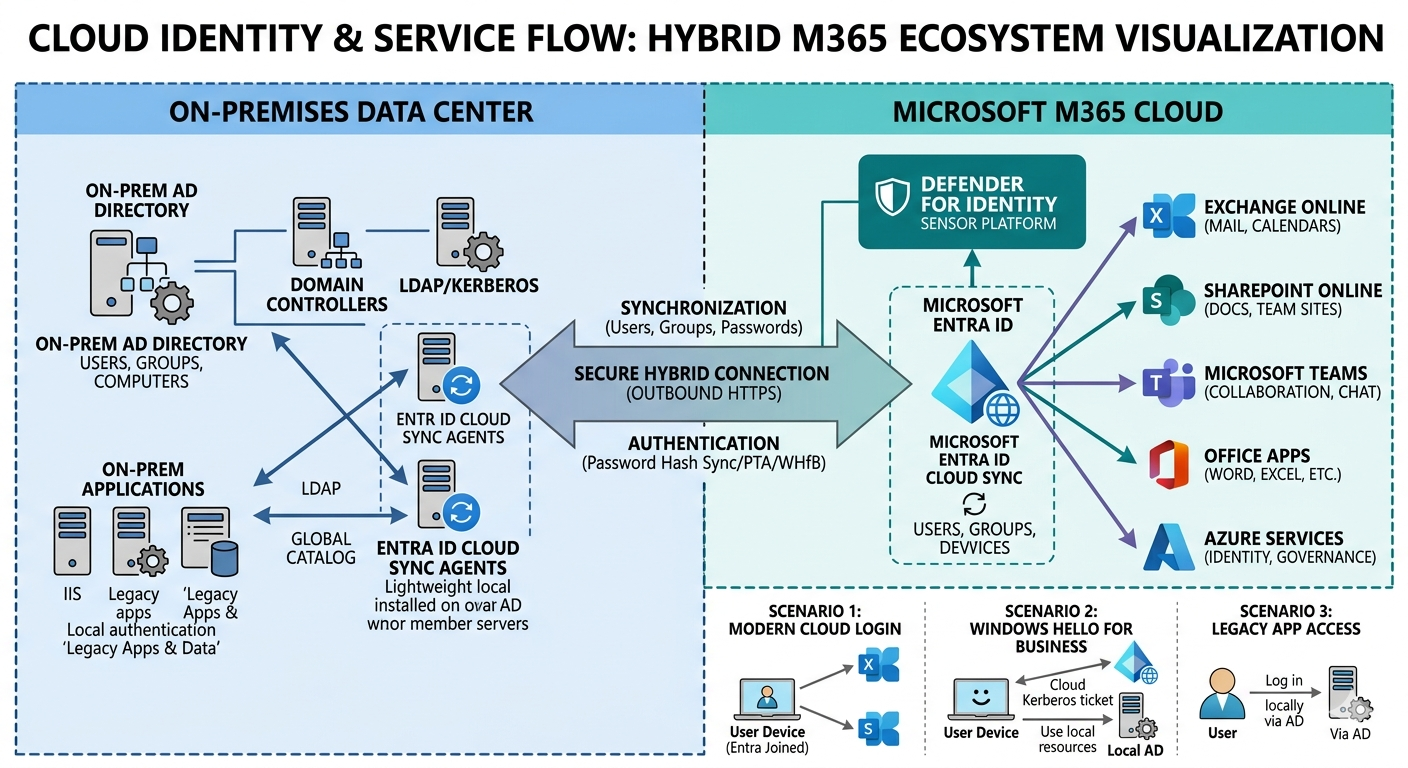
Cloud Identity & Service Flow
Visualization of the Hybrid M365 ecosystem including Entra ID and On-Premises synchronization.
Enterprise Core Services
📫 Exchange Online
Messaging at scale. Led critical transitions from legacy infrastructures, including Exchange Server 2019 CU15 to Subscription Edition.
🆔 Microsoft Entra ID
Modern identity perimeter. Implementing Zero Trust, Conditional Access, and seamless SSO across global enterprises.
📄 SharePoint Online
The enterprise content backbone. Successfully executed a 60-day migration of 6.3 TB of data for 270 users.
📱 Intune Management
Modern Endpoint Management (UEM). Deploying MDM/MAM policies to ensure data compliance on mobile and desktop.
🛡️ Microsoft Defender
XDR Capabilities. Remediation of identity threats and endpoint vulnerabilities to harden the security posture.
🤝 Microsoft Teams
Unified communication hub. Integrating third-party apps, telephony, and collaborative workflows into a single interface.
Strategic Licensing Tiers
Business Premium
- Desktop Office Apps
- Intune & Defender Business
- Azure AD Premium P1
- Auto-enrollment (Autopilot)
Enterprise E3
- Advanced Info Protection
- eDiscovery (Basic)
- On-Prem CAL Rights
- Unlimited Archiving (Expansion)
Enterprise E5
- Defender for Identity / Cloud
- Advanced eDiscovery
- Power BI Pro & Analytics
- Teams Phone (PSTN)
DLP Implementation
A deep dive into securing organizational data across collaboration spaces using Microsoft 365 E5 compliance policies and real-time monitoring.
How to Stop Data Leaks Across Email, Teams, and Social Apps Using M365 E5 DLP
Protect your organization’s sensitive information from accidental exposure. Learn how to configure robust Microsoft 365 E5 Data Loss Prevention policies to actively prevent data leaks across core communication platforms.
DLP Deep Dive Part 1: Guarding Exchange Online Email
Lock down corporate email communication. Discover advanced rule triggers, custom sensitive info types (SITs), and routing behaviors to filter out data leaks via Outlook and Exchange Online.
DLP Deep Dive Part 2: Locking Down Microsoft Teams External Chats
Secure real-time collaboration channels. Learn how to monitor, block, and intercept shared sensitive payloads within internal and cross-tenant external Microsoft Teams chat sessions.
DLP Deep Dive Part 3: Weaponizing Endpoint DLP for Cloud and Social Apps
Extend security boundaries directly to user hardware. Configure Endpoint DLP policies to track and restrict sensitive file transfers into unauthorized browsers, cloud repositories, and social apps.
DLP Deep Dive Part 4: Troubleshooting and Forcing Endpoint DLP Policy Syncs
Stop waiting hours for policy updates. Explore operational methods to forcefully refresh and synchronize newly modified Endpoint DLP conditions on remote client machines instantly.
DLP Deep Dive Part 5: Customizing Endpoint DLP Toast Notifications
Refine end-user awareness banners. Learn how to customize endpoint desktop toast alerts and user justification prompts to educate teams on data compliance in real-time.