MAHARJAN-BINOD
Microsoft Exchange: messaging infrastructure built to stay available
Microsoft Exchange is the industry-standard messaging platform for enterprise collaboration. As an infrastructure specialist, I design and manage highly available environments that unify email, calendaring, and task management with a focus on security, compliance, and 99.9% uptime.
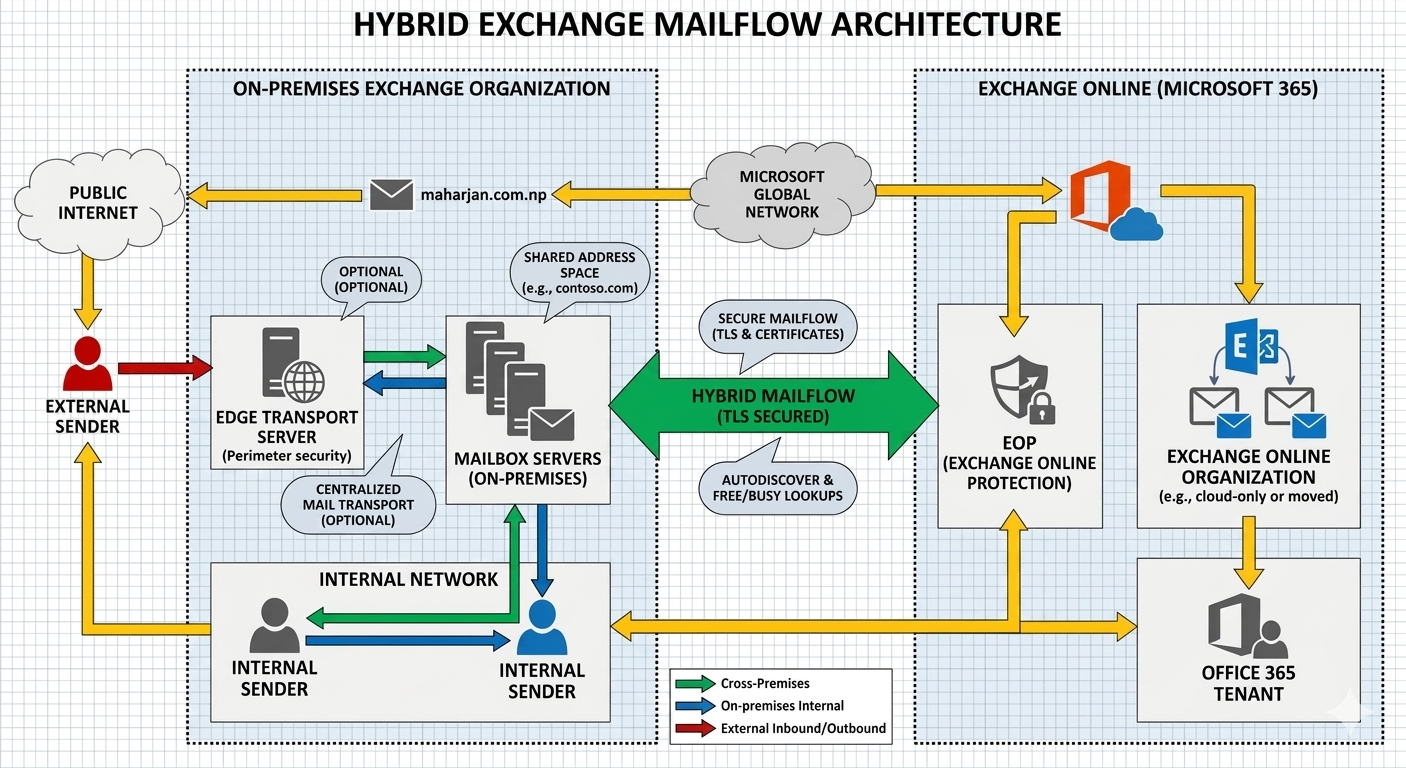
How messages move between transport services, mailbox databases, and the internet-facing edge — the path every inbound and outbound email follows.
Deployment Models
Which one fits depends on compliance needs, existing infrastructure, and how much you want to manage on-premises.
Standalone Server
A single Exchange server handling all roles — straightforward, but with no built-in failover.
High AvailabilityDAG
Multiple mailbox servers replicate databases for automatic failover if one server or disk fails.
Migration StateCo-Existence
Two Exchange versions — or Exchange and Exchange Online — running side-by-side during a phased migration.
On-Prem + CloudExchange Hybrid
On-premises Exchange bridged with Exchange Online, sharing free/busy data and cross-premises mailbox moves.
Infrastructure Roles & Features
The components that keep mail flowing, protected, and recoverable.
Mailbox Server Role
In modern architecture, this consolidated role handles storage, client access services (legacy CAS), and transport services (legacy Hub) in one unified engine.
Database Availability Group
The foundation of high availability — automatic database-level recovery from individual server or disk failures, with no manual failover step.
Edge Transport Role
A specialized server typically deployed in the DMZ to handle inbound and outbound internet mail flow, adding a layer of anti-spam protection before mail reaches the mailbox tier.
Exchange Online (M365)
Leveraging cloud-native messaging to reduce on-premises footprint while maintaining granular control through the Exchange Admin Center (EAC).
Hybrid Configuration
Seamlessly bridging on-premises Exchange with Microsoft 365, allowing cross-premises mailbox moves and shared free/busy calendar data.
Security & Compliance
Implementing Data Loss Prevention (DLP), in-place archiving, and eDiscovery to meet modern regulatory requirements and data protection standards.
Continue Reading — Exchange Deep-Dives
Specific walkthroughs from real deployments and upgrades.
Exchange 2019 CU13
What changed in the update, and what to test before patching production.
→ CU15Exchange 2019 CU15
The latest cumulative update for Exchange 2019 — upgrade path and known issues.
→ SESubscription Edition
What’s different about Exchange Server Subscription Edition versus the traditional release model.
→ MFAMFA for OWA Login
Adding multi-factor authentication to Outlook Web Access without breaking legacy clients.
→ ArchiveArchiving Solution
A complete walkthrough of deploying Mailvault for enterprise email archiving.
→Before You Reach Out
Common questions about Exchange engagements.
Should we move to Exchange Online, stay on-premises, or run hybrid?
It depends on compliance requirements, existing investment in on-prem infrastructure, and how much administrative overhead you want to keep. A short scoping conversation usually settles it once those constraints are clear.
How disruptive is a CU update or mailbox migration?
Patching and migrations are scheduled and tested in a maintenance window. With a DAG in place, failover keeps mailboxes available while any single server is being updated.
Will our DLP and retention policies carry over during a migration?
Yes — DLP rules, retention policies, and in-place archiving are mapped and migrated alongside mailboxes, rather than rebuilt from scratch afterward.
Do you support ongoing patching after the initial deployment?
Most engagements end with a handover runbook for your team. Ongoing CU patching and certificate renewal can also be scoped separately if you’d rather have it managed.
Need Exchange hardened, migrated, or running hybrid?
Get in touch →📘 Exchange Knowledge Base
- Sending Spoofed Emails via Telnet & Header Analysis
- Securing Exchange Management Shell (EMS)
- Enabling Password Reset in Exchange ECP
- Setup and Use Cases for Public Folders
- Restricting Recipient Limits per User
- Customizing OWA Login, Favicon & Text
- Post-Login: Understanding OWA Customization
- Modifying Disclaimer Text on OWA Logon
- Customizing OWA Language Selection
- Restricting ECP Login to Specific IP Addresses
- Activating Exchange Server 2019 Post-Install