Active Directory Vulnerability: The Print Spooler on Domain Controllers
Even in 2026, the Print Spooler remains a Tier-0 attack vector. If your Domain Controller is running the Spooler service, an attacker can likely escalate to Domain Admin in minutes. Disable it now.
In the cybersecurity landscape of 2026, we often focus on AI-driven threats and zero-day cloud exploits. However, one of the most reliable ways for an attacker to compromise an entire organization remains a service that has been around since the 1990s: the Windows Print Spooler.
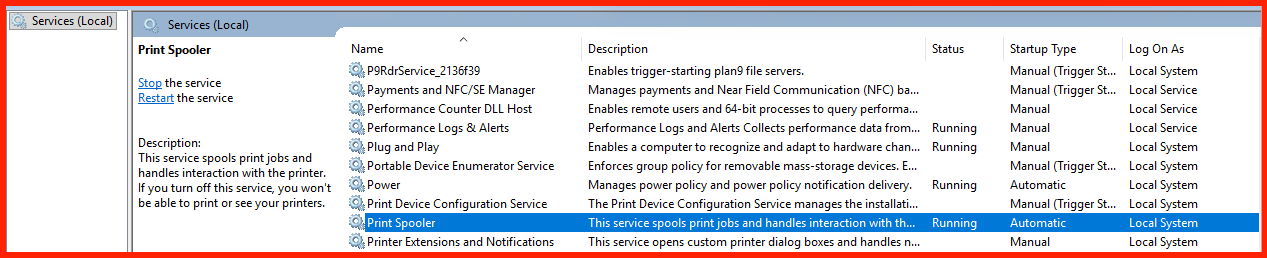
Visualizing the Print Spooler Running Service
Why the Spooler is a “Domain Killer”
The Print Spooler (spoolsv.exe) manages print jobs but runs with SYSTEM privileges. When active on a Domain Controller (DC), it provides lethal pathways for attackers:
- Remote Code Execution (RCE): Recent 2026-specific overflows (such as CVE-2026-23669) allow attackers to inject malicious DLLs directly into the DC’s memory.
- Authentication Coercion: Attackers can force the DC to authenticate to a rogue server, allowing for NTLM relay attacks that bypass MFA.
Critical Note: A Domain Controller is a high-value identity vault. It should never be used as a Print Server.
Vulnerable Ports & Protocols
- Port 445 (SMB): Accesses the
\pipe\spoolssnamed pipe. - Port 135 (RPC): Initial endpoint mapping.
- High RPC Ports (49152-65535): Payload delivery.
Verify Vulnerability (PowerShell)
Get-Service -Name Spooler | Select-Object Name, Status, StartType
2026 Remediation Strategy
1. Disable the Service
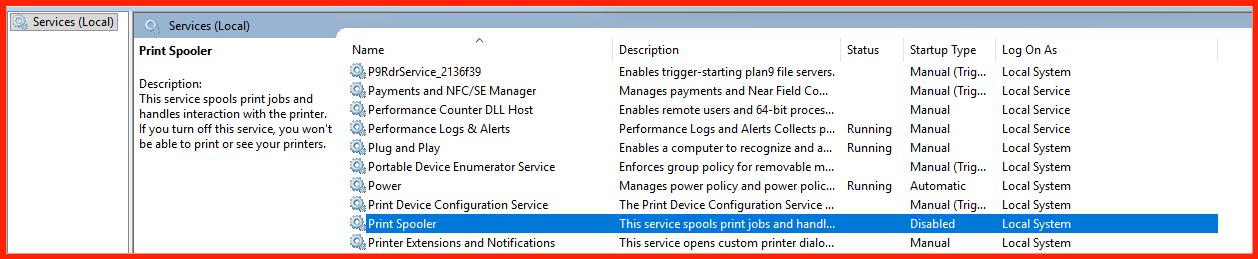
Use Group Policy (GPO) to set the Print Spooler service to Disabled on all servers in the “Domain Controllers” OU.
2. Hardening Alternative
If you cannot disable it, restrict remote access:
Computer Configuration -> Administrative Templates -> Printers -> Allow Print Spooler to accept client connections: Disabled
Visualizing the Service
References & Technical Documentation
- Microsoft: Security Update Guide & CVE-2026-23669 Analysis
- Medium Blog: Compromise of Windows Print Spooler
- Microsoft Learn: Best Practices for Securing Domain Controllers
- Technical Resource: Understanding MS-RPRN Authentication Coercion